
iPhone Battery Health Tips 2026
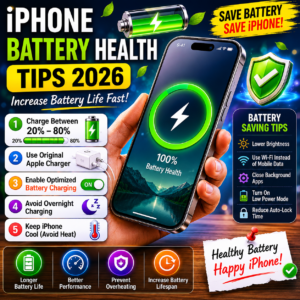
Table of Contents
- iPhone Battery Health Tips
- Why Battery Health Matters
- Common Charging Mistakes
- Best Charging Habits
- Battery Saving Tricks
- Overheating Problem Solution
- How to Check Battery Health
- Final Verdict
iPhone Battery Health Tips
अगर आपके iPhone की battery जल्दी खत्म होती है या battery health तेजी से गिर रही है, तो यह article आपके लिए बहुत useful है। इन आसान iPhone Battery Health Tips की मदद से आप अपने iPhone की battery life को लंबे समय तक healthy रख सकते हैं।
Apple devices powerful performance देते हैं, लेकिन गलत charging habits battery health को नुकसान पहुंचा सकती हैं।
Why Battery Health Matters
Battery health आपके iPhone performance को directly affect करती है।
खराब battery health के नुकसान
- Fast battery drain
- Phone heating
- Slow performance
- Charging issues
- Unexpected shutdowns
इसी वजह से users अक्सर iPhone Battery Health Tips search करते हैं।
Common Charging Mistakes
1. Overnight Charging
पूरी रात charging पर phone छोड़ना battery heating बढ़ा सकता है।
2. Fake Charger Use करना
Local chargers battery को damage कर सकते हैं।
3. 0% तक Battery खत्म करना
बार-बार battery पूरी खत्म करना battery lifespan कम कर सकता है।
4. Gaming During Charging
Charging करते समय heavy gaming overheating बढ़ा सकती है।
Best iPhone Charging Habits
Charge Between 20% to 80%
Experts के अनुसार battery को 20%-80% के बीच रखना बेहतर होता है।
Use Original Apple Charger
Original charger safe charging और battery protection देता है।
Enable Optimized Battery Charging
यह feature battery aging कम करने में मदद करता है।
Enable करने का तरीका
Settings → Battery → Battery Health → Optimized Battery Charging ON
iPhone Battery Saving Tips
1. Low Power Mode ON करें
Low Power Mode battery backup बढ़ाने में मदद करता है।
2. Background Apps बंद करें
Unused apps battery drain बढ़ाते हैं।
3. Brightness कम रखें
High brightness battery जल्दी खत्म करती है।
4. Auto-Lock Time कम करें
Screen ज्यादा देर ON रहने से battery drain होती है।
iPhone Overheating Problem Solution
Avoid These Things
- Direct sunlight
- Heavy gaming for long time
- Fast charging continuously
- Using phone while charging
Best Solution
Phone को cool environment में रखें।
How to Check iPhone Battery Health
Simple Steps
- Open Settings
- Go to Battery
- Tap Battery Health & Charging
- Check Maximum Capacity
अगर battery health 80% से नीचे है, तो battery replacement consider कर सकते हैं।
Best Settings for Better Battery Life
| Setting | Benefit |
|---|---|
| Dark Mode | Battery Saving |
| Low Brightness | Less Battery Drain |
| WiFi Use | Better Efficiency |
| Low Power Mode | Longer Backup |
Extra iPhone Battery Health Tips
Important Tips
- Latest iOS update रखें
- Fake accessories avoid करें
- Extreme heat से बचें
- Unused widgets remove करें
- iPhone Charging Tips
- iPhone Overheating Problem Fix
- Best iPhone Tricks
इन आसान iPhone Battery Health Tips को follow करके आप अपने iPhone की battery life और performance दोनों improve कर सकते हैं।
अगर आप सही charging habits अपनाते हैं और overheating avoid करते हैं, तो आपका iPhone लंबे समय तक smooth और healthy performance देगा।